Posted on 8 March 2026
Open Item Statement Template Excel
- The open item statement template is available in Excel and Google Sheets.
- It allows businesses to quickly identify what customers still owe and how long invoices have remained unpaid.
- Makes it easier to focus collection efforts on high-risk accounts.
- Helps finance teams monitor receivable health and reduce delayed payments that can disrupt cash flow.


What is the Open Item Statement Template?
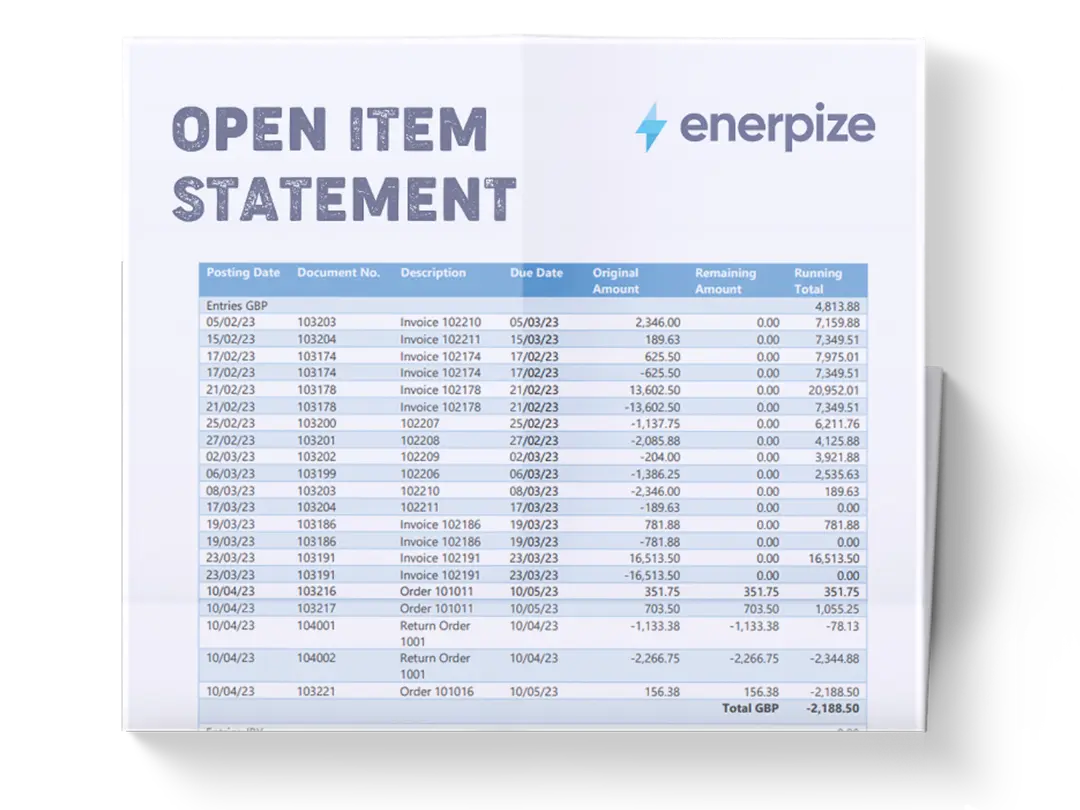
An Open Item Statement Template monitors unpaid invoices, customer balances, and payment activity within an accounts receivable process. It organizes invoice information into a single tabular statement that clearly identifies which transactions remain open. By maintaining a detailed record of receivables, the template allows businesses to track payment timelines, identify overdue invoices, and categorize outstanding balances by aging period.
What Does The Open Item Statement Template Contain?
Customer Name
Identifies the customer associated with each invoice. This field allows businesses to track multiple invoices per client and group outstanding balances by customer account.
Invoice No
A unique reference number assigned to each invoice. This identifier helps link the entry to the original billing document and simplifies future tracking, reconciliation, or dispute resolution.
Invoice Date
Records the exact date the invoice was issued. This date establishes the start of the billing timeline and helps determine how long the receivable has been outstanding.
Due Date
Specifies the expected payment deadline for the invoice. This field is critical for determining whether a payment is current or overdue.
Description
Provides a brief explanation of the product or service billed. Including a description adds context and helps differentiate between invoices when reviewing statements or resolving questions with customers.
Debit (Invoice)
Represents the total amount billed to the customer for the specific invoice. This value reflects the original receivable created when the invoice was issued.
Credit (Payment)
Shows payments received from the customer that reduce the invoice balance. Recording credits ensures that the outstanding balance accurately reflects what remains unpaid.
Adjustment
Captures any modifications made to the invoice amount, such as discounts, write-offs, or billing corrections.
Outstanding Balance
Displays the remaining unpaid amount after payments and adjustments have been applied.
Aging (Days)
Indicates how many days have passed since the invoice due date or invoice date. This helps determine how overdue the invoice is.
Current
Shows balances that are still within the agreed payment period and not yet overdue.
1–30 Days
Categorizes balances that are between 1 and 30 days overdue.
31–60 Days
Identifies invoices that have remained unpaid for 31 to 60 days after the due date.
60+ Days
Highlights invoices that have exceeded 60 days overdue, signaling a high-risk receivable that may require escalation or stronger collection actions.
How to Use the Open Item Statement Template
1- Prepare Your Invoice Records
Before using the template, gather all invoices issued to customers along with payment confirmations, bank statements, and adjustment notes. These documents ensure that every receivable entry is recorded accurately and that payment activity can be verified when updating balances.
2- Enter Customer Information
Start by filling in the Customer Name column for each invoice entry. If a customer has multiple invoices, list each one on a separate row to maintain a detailed transaction history.
3- Record Invoice Details
- Enter the Invoice Number to create a unique reference point.
- Add the Invoice Date to indicate when the invoice was issued.
- Input the Due Date based on the agreed payment terms.
- Include a short Description explaining the billed service or product.
These fields create the foundational record for each receivable transaction.
4- Input the Invoice Amount
In the Debit (Invoice) column, enter the total billed amount for that invoice. This value represents the receivable created when the invoice was issued.
5- Record Payments Received
Whenever a customer makes a payment, update the Credit (Payment) column with the amount received. This step ensures the outstanding balance accurately reflects the remaining amount due.
6- Apply Adjustments When Necessary
If discounts, partial write-offs, or billing corrections occur, record them in the Adjustment column. Adjustments ensure that the invoice balance reflects the correct payable amount.
7- Calculate the Outstanding Balance
After entering the debit, payment, and adjustment amounts, update the Outstanding Balance column to reflect the remaining unpaid amount.
8- Monitor Invoice Aging
Use the Aging (Days) column to track how long an invoice has remained unpaid. Based on the aging period, categorize the balance into the appropriate bucket to identify which invoices require follow-up actions.
9- Review Totals and Receivable Health
At the bottom of the template, review the totals row for a snapshot of your accounts receivable performance.
10- Update the Template Regularly
To maintain accurate receivable records, update the template whenever a new invoice is issued, a payment is received, an adjustment is made, or an aging category change.
Ensure the statement reflects real-time receivable status and supports timely collections.
Related Templates:
Importance of the Open Item Statement Template
Improves visibility into outstanding customer balances
Without a structured statement of open receivables, businesses often struggle to identify which invoices remain unpaid or how long balances have been outstanding. An open item statement template consolidates all receivable activity into a single view, allowing finance teams to quickly see which customers owe money and the exact value of those outstanding balances. This transparency eliminates guesswork and ensures that overdue accounts are identified early. In practice, this visibility enables businesses to take proactive collection actions before invoices become significantly overdue. By maintaining a clear snapshot of receivable status, companies gain stronger financial control and reduce the likelihood of revenue leakage caused by missed payments.
Strengthens accounts receivable management and collections
Effective receivable management depends on knowing which invoices require follow-up and when action should be taken. The template’s aging structure helps finance teams prioritize collection efforts based on how long invoices have remained unpaid. For example, balances within the 1–30 day range may only require a reminder email, while 60+ day invoices may require direct escalation or revised payment terms. This structured approach allows businesses to allocate collection resources more effectively and prevent receivables from becoming long-term liabilities. Over time, consistent tracking and follow-ups can significantly reduce average collection periods and improve overall payment discipline among customers.
Supports accurate financial reporting and cash flow monitoring
Accounts receivable directly affect a company’s cash flow and financial stability. When receivable balances are not tracked properly, businesses may overestimate available cash or overlook delayed payments that impact operational planning. An open item statement template ensures that receivable amounts, payments, and adjustments are recorded systematically, providing a reliable record of expected incoming cash. This information becomes particularly valuable during financial reporting periods, budgeting cycles, or cash flow forecasting. By maintaining an accurate overview of open invoices, businesses can make better financial decisions and maintain healthier liquidity levels.
Creates a clear audit trail for financial oversight
A well-maintained open item statement provides a documented history of invoice activity, including billing, payments, and adjustments. This documentation creates a reliable audit trail that can be used to verify financial transactions during internal reviews or external audits. When disputes arise with customers regarding billing or payment records, the template also provides a clear reference for resolving discrepancies quickly. Maintaining this level of documentation strengthens internal controls and reinforces accountability within financial operations. Over time, the template becomes a valuable historical record of receivable management practices and customer payment behavior.
Who Can Use the Open Item Statement Template?
Small business owners managing their own billing and collections
Small businesses often operate without a dedicated finance department, meaning owners must oversee invoicing, payment tracking, and collections themselves. An open item statement template simplifies this process by organizing all receivable information in one structured document. Instead of manually searching through invoices and bank statements to determine who has paid, business owners can instantly see which invoices remain open and which customers require follow-up. This visibility helps prevent missed payments and ensures revenue is collected on time. For small businesses where cash flow stability is critical, maintaining a clear overview of receivables can significantly improve financial predictability.
Accounts receivable teams handling multiple customer invoices
Organizations that issue large numbers of invoices often require a systematic approach to tracking payments across multiple customers. Accounts receivable teams can use the template to maintain an organized record of invoice activity and monitor aging balances across different accounts. This structure allows finance staff to quickly identify overdue invoices and prioritize collection efforts accordingly. Instead of reviewing invoices individually, the template provides a centralized statement that highlights receivable risks and collection opportunities. As a result, teams can manage high volumes of billing activity more efficiently while maintaining accurate financial records.
Freelancers and service providers billing clients on recurring projects
Independent professionals—such as consultants, designers, developers, and marketers—often work with multiple clients simultaneously and issue recurring invoices for services. An open item statement template helps freelancers track which invoices have been paid and which remain outstanding across different projects. This clarity reduces the risk of overlooking unpaid invoices and allows freelancers to maintain professional billing practices. Additionally, tracking aging balances helps identify clients who frequently delay payments, enabling freelancers to adjust payment terms or implement deposit requirements for future work.
Finance managers overseeing receivable performance and cash flow
Finance managers and controllers rely on accurate receivable data to monitor business performance and forecast cash inflows. The open item statement template provides a consolidated view of receivable balances across customers and aging categories, allowing managers to assess the overall health of the company’s billing operations. By analyzing trends in overdue invoices, finance leaders can identify systemic issues—such as inefficient billing cycles or lenient credit policies—that may affect cash flow stability. This insight supports strategic decisions aimed at improving payment cycles, strengthening receivable controls, and maintaining sustainable financial operations.
Looking for Beyond Just Tracking Outstanding Invoices?
While our Open Item Statement Template helps you monitor unpaid invoices and track receivable aging, businesses often need more advanced capabilities. That’s where Enerpize, our all-in-one ERP platform, comes in.
With Enerpize Online Invoicing Software, you can:
- Automatically generate and track invoices across customers and projects.
- Integrate accounting, payments, and financial reporting into one system.
- Gain real-time visibility into cash flow, receivables, and business performance.
If you’re ready to move beyond spreadsheets, Enerpize brings enterprise-grade control to growing teams.