Posted on 18 December 2025
Weekly Expense Report Template Excel & Word
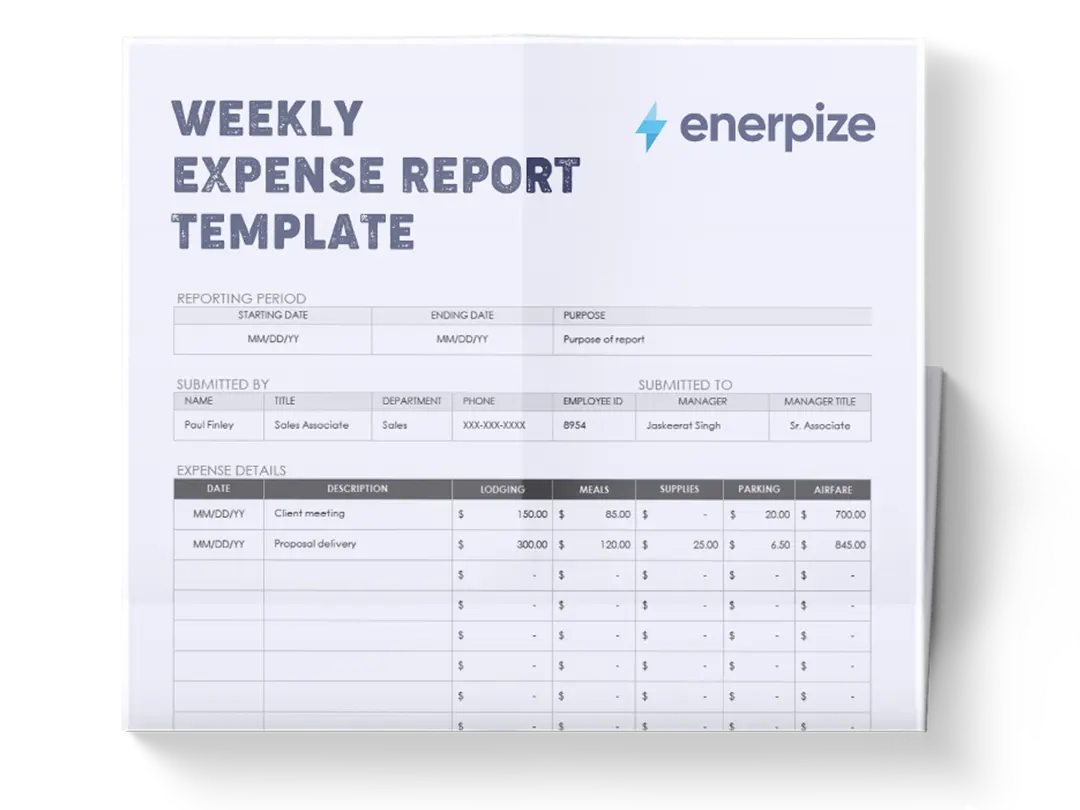
- The weekly expense report template is available in Excel, Google Sheets, Word, and Google Docs.
- It records weekly business expenses by day, category, and payment source, including mileage, travel, lodging, meals, and supplies.
- Used for expense reimbursement, internal cost tracking, and managerial review and approval.
- Ideal for employees, managers, finance teams, and organizations that require clear, auditable weekly expense documentation.


What Is a Weekly Expense Report Template?
A weekly expense report template is designed to organize and summarize business-related expenses incurred over a defined workweek. It records who incurred the expenses, when they occurred, how they were paid, and which categories they belong to, ensuring that financial data is complete, consistent, and ready for review or reimbursement.
By separating employee-paid expenses from company-funded expenses and tracking costs day by day, the template creates immediate visibility into spending patterns while maintaining a clear audit trail.
This weekly expense report functions as both a reporting and control tool. It aligns employee submissions with managerial approval requirements by combining business details, reporting context, detailed expense tables, itemized explanations, and formal sign-off sections into a single document. When used consistently, it reduces back-and-forth on clarifications, minimizes errors, and enables faster approvals while maintaining accountability across teams.
What Does the Weekly Expense Report Template Contain?
Business Details
- Business Name: Identifies the organization associated with the expense report.
- Business Address: Records the official business location for reference and documentation.
- Business Phone: Provides a contact number linked to the business.
- Business Email: Supplies an official email address for communication or record purposes.
Report Details
- Week Starting: Defines the beginning date of the reporting period.
- Week Ending: Defines the end date of the reporting period.
- Purpose: States the reason or context for the expenses reported during the week.
- Submitted By: Identifies the individual completing and submitting the report.
- Submitted To: Identifies the recipient responsible for reviewing the report.
Manager Details
- Name: Records the manager’s name associated with the review or oversight.
- Department: Specifies the department linked to the manager or report.
- Phone: Lists a contact number for the manager.
- ID: Captures an internal identifier associated with the manager.
Expenses Paid by Employee
A daily expense table covering: weekday, mileage, mileage rate, mileage total, airfare, transportation, rental vehicle, lodging, meals & tips, supplies, and parking.
includes rows for Sunday through Saturday and a totals row to summarize weekly amounts.
Expenses Paid With Company Funds
A second daily expense table mirroring the same structure and categories as the employee-paid expenses section, used specifically for costs paid directly using company resources.
Itemized Expenses or Description of “Other”
This section allows multiple entries with dates, descriptions, and amounts.
Approval
Provides formal confirmation of submission and authorization.
How to Use the Weekly Expense Report Template
1- Complete the Business Details First
Begin by entering the Business Name, Address, Phone, and Email. This establishes organizational ownership of the report and ensures the document is correctly attributed before any expense data is added.
2- Define the Reporting Period and Context
Fill in the Week Starting and Week Ending fields to clearly set the time frame. Add a concise but specific entry in the Purpose field to explain why the expenses were incurred during this week.
3- Identify Submission and Review Roles
Enter the name of the person completing the report under Submitted By and the intended reviewer under Submitted To. Then complete the Manager Details section to associate the report with the appropriate department and manager.
4- Record Employee-Paid Expenses by Day
In the Expenses Paid by Employee table, enter expense amounts for each weekday under the appropriate category. Mileage is recorded alongside the mileage rate and calculated mileage total, while all other costs are logged directly in their respective columns.
5- Summarize Employee-Paid Totals
Use the Totals row to aggregate mileage totals and category totals for the entire week, providing a weekly snapshot of employee-incurred costs.
6- Record Company-Funded Expenses Separately
Repeat the same daily process in the Expenses Paid With Company Funds table. This separation ensures clarity between reimbursable expenses and those already covered by the company.
7- Add Detailed Explanations Where Needed
Use the Itemized Expenses or Description of “Other” section to explain individual expenses that require clarification, additional context, or do not fit neatly into the predefined categories.
8- Include Internal Comments if Applicable
If necessary, office staff or reviewers can use the Additional Notes – For Office Use Only section to document decisions, questions, or adjustments.
9- Finalize With Signatures
Complete the Approval section by obtaining signatures and dates from both the requester and the approver to close the reporting process formally.
Importance of the Weekly Expense Report Template
Ensures Consistent Expense Documentation
A fixed weekly structure standardizes how expenses are reported, minimizing variability and potential errors. Employees know exactly which categories to use, how to record mileage and travel costs, and where to provide additional explanations. Over time, this creates a uniform dataset that allows organizations to identify trends, anomalies, or repeated errors quickly.
Consistency also makes it easier to train new employees and reduces the need for extensive back-and-forth clarification with managers or finance staff.
Improves Financial Visibility
Tracking expenses daily allows both employees and managers to maintain a real-time understanding of spending patterns. Managers can see which departments or individuals incur higher costs and can proactively address budgetary concerns.
Finance teams benefit from accurate weekly snapshots, enabling better cash flow forecasting, identifying overspending, and making informed decisions on cost allocation. The granular visibility provided by the template also supports strategic planning and resource optimization.
Supports Reimbursement Accuracy
Clearly separating expenses paid personally by employees from those covered directly by the company eliminates confusion about which costs require reimbursement. This separation ensures that employees are reimbursed accurately and fairly for out-of-pocket expenses.
It also reduces the risk of double payments or missing reimbursements. By providing a structured and detailed record, the template helps prevent disputes between employees and finance teams and improves overall trust in the expense management process.
Strengthens Internal Controls
The weekly expense report template’s approval and office-use sections serve as built-in control mechanisms. They document who submitted the report, who reviewed it, and who approved it, creating accountability at each step.
Managers can quickly verify that all expenses are legitimate, within company policy, and properly categorized. This layer of oversight not only reduces the risk of errors and fraud but also provides a clear escalation path if discrepancies are found. Over time, these internal controls reinforce disciplined expense management practices across the organization.
Creates an Audit-Ready Record
The structured tables, itemized entries, and totals provide a complete and organized record suitable for both internal and external audits. Each expense is clearly attributed to a specific day, category, and payment source, reducing ambiguity and simplifying verification. Signed approval fields further authenticate the report. This audit-ready format supports regulatory compliance, facilitates financial reporting, and ensures transparency across departments. Organizations can confidently maintain records that stand up to scrutiny, providing peace of mind to management, auditors, and stakeholders alike.
Enables Data-Driven Insights
Beyond compliance and reimbursement, the weekly expense report template allows organizations to generate actionable insights from historical data. By analyzing recurring expenses, peak spending periods, and cost-saving opportunities, finance teams can identify inefficiencies and implement targeted improvements.
Managers can also use this data to guide budgeting, negotiate better vendor agreements, or implement policies that optimize overall spending without compromising employee productivity.
Promotes Organizational Efficiency
A well-maintained expense reporting template reduces administrative overhead. Employees spend less time compiling reports, finance teams spend less time reconciling expenses, and managers can review submissions quickly and effectively. By streamlining these workflows, the template contributes to faster approvals, fewer errors, and smoother operational efficiency across the organization.
Who Can Use the Weekly Expense Report Template?
Employees
Employees use the template to document weekly business expenses clearly and systematically, reducing follow-up questions and speeding up reimbursement.
Managers
Managers rely on the structured layout to review expenses efficiently, assess reasonableness, and approve reports with confidence.
Finance and Accounting Teams
Finance teams use the standardized data to reconcile expenses, track weekly spending, and maintain organized financial records.
Small to Mid-Sized Businesses
Organizations without complex expense software benefit from a single, comprehensive document that handles reporting, review, and approval.
Project-Based or Travel-Heavy Teams
Teams with frequent mileage, travel, or daily expenses can use the weekly format to maintain control without excessive administrative overhead.